

Latest Version
kozec
Communication
Linux
Free
me.kozec.syncthingtk
Report a Problem
More About Syncthing GTK
Streamline Your File Syncing with Syncthing GTK
If you are looking for a seamless way to manage decentralized file transfers on your Linux desktop, Syncthing GTK file synchronization offers the ultimate graphical interface to keep your data moving without relying on command-line tools. Developed by kozec, this clever utility integrates directly into your desktop environment, bridging the gap between Syncthing's powerful backend and your daily workflow.
What Makes Syncthing GTK Essential?
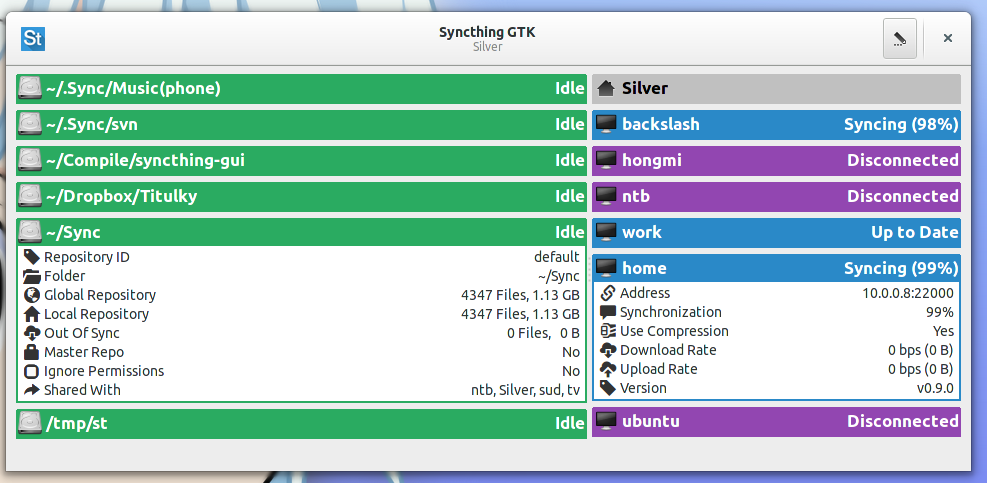
Instead of keeping a browser tab constantly open to monitor your shared folders, this application places a dedicated icon right in your notification area. It provides real-time status updates, desktop notifications, and instant access to your synchronization settings without the friction of the standard WebUI.
Core Features and Desktop Integration
The utility does much more than mirror the web interface; it enhances your entire operating system integration with several dedicated tools:
- Seamless Desktop Integration: Built-in support for popular Linux file managers including Nautilus, Nemo, and Caja, allowing you to see sync statuses directly in your folders.
- Automated Daemon Control: Easily run the Syncthing daemon in the background, with options to start, restart, or shutdown the server directly from the interface.
- First Run Wizard: A helpful configuration assistant makes initial setup painless, even for those new to decentralized file sharing.
- Smart Node Management: Features a half-automatic setup wizard for adding, editing, or deleting repositories and network nodes.
- Complete WebUI Parity: Access every configuration option available in the standard web interface, including advanced daemon settings.
Who Is This Linux Sync Utility For?
This software is perfect for Linux users who value privacy and prefer local, peer-to-peer file synchronization over centralized cloud providers. By wrapping the robust Syncthing core in a clean GTK interface, developer kozec has created an essential tool for developers, system administrators, and privacy advocates who want visual confirmation that their files are securely updated across their devices.
Our Verdict: A Must-Have Linux Companion
Syncthing GTK file synchronization successfully removes the complexity of managing peer-to-peer transfers. It runs quietly in the background, keeps you informed with native desktop notifications, and ensures your repository settings are always just a click away. If you are ready to elevate your file-sharing setup, head over to the official Flathub store page to explore Syncthing GTK for your Linux system.
Rate the App
User Reviews












Popular Apps










Editor's Choice